
Our verdict
An easy, flexible work board that reviewers on G2 and Capterra rate highly. For small teams the catch is billing: you pay for at least 3 seats, seats come in fixed steps, and automations start on Standard. If your team size lands on a step, Standard at $12 a seat is fair. If it doesn't, compare tools that bill per person.
- Best for
- Teams of 3, 5 or 10 people who want a visual board for projects, clients or content, with simple automations and little setup
- Skip if
- Solo operators and teams of 2 who want automations, teams whose headcount falls between seat steps (6, 11, 16…), and anyone who needs fast human support on lower plans
- Price
- Free for up to 2 seats. Per seat per month: Basic $9 (annual) or about $12 (monthly); Standard $12 or about $14; Pro $19 or about $24; Enterprise custom. Minimum 3 seats on paid plans. 14-day Pro trial, no credit card
What works
- Free plan for up to 2 seats, and every paid plan has a 14-day trial with no credit card, per the pricing page
- Reviewers on G2 and Capterra consistently call it easy to learn and pleasant to use
- Unlimited free viewers on paid plans, so clients or bosses can watch boards without a seat
- Standard adds timeline (Gantt), calendar view, guest access and 250 automations a month
What doesn't
- Paid plans start at 3 seats and grow in fixed steps, so a team of 6 is billed for 10
- The $9 Basic plan has no automations or integrations, so most teams that want to save time need Standard
- Trustpilot score is 2.0 out of 5, with complaints about support, billing and cancelling
- Private boards and time tracking are Pro features at $19 a seat
We have not used monday.com on our own sites. This guide to monday.com pricing is based on monday.com's pricing page and blog, its support and community pages, recent independent pricing guides and public user reviews, all checked on November 1, 2026. Sources are listed at the end.
Short version: monday.com's per-seat prices look low, but you don't buy seats one at a time. The seat rules decide what a small team really pays.
What monday.com is
monday.com is a work management tool built around boards: tables of items (tasks, clients, orders, posts) with columns for status, owner, dates and anything else you need. You can view the same board as a Kanban, calendar, timeline or dashboard, depending on the plan.
The company sells several products on the same platform: work management (the main one, covered here), monday CRM, monday service for help desks and monday dev for software teams. Each has its own price list. This review covers work management unless we say otherwise.
The pricing page now leads with AI. Every paid plan includes a monthly allowance of AI credits for features like summaries and AI "agents", and the free plan has none.
What monday.com costs in 2026
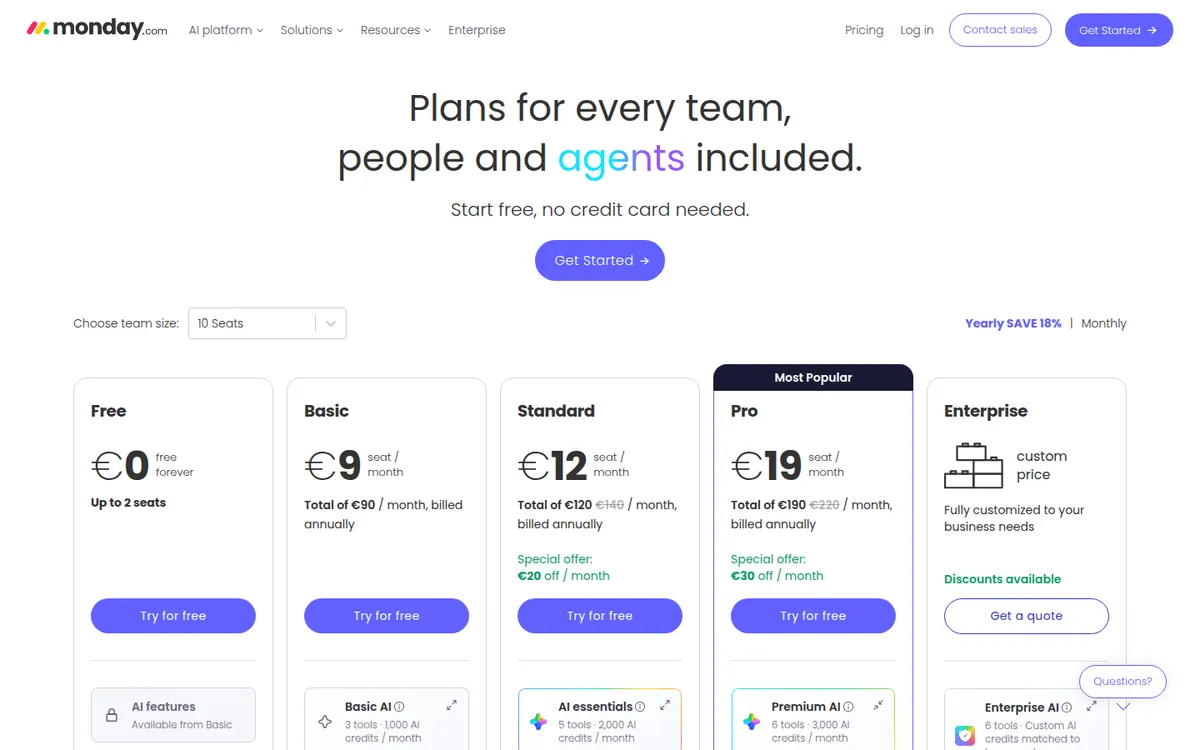
Our server is in Europe, so monday.com's pricing page showed us euros. The numbers matched the U.S. dollar prices reported by two recent independent guides (TinyCommand, updated September 2026, and Carly, July 2026), so we list them in dollars here.
| Plan | Per seat, billed yearly | Per seat, billed monthly | Seats | Key limits |
|---|---|---|---|---|
| Free | $0 | $0 | Up to 2 | 3 boards, 3 docs, no automations, no AI credits |
| Basic | $9 | about $12 | 3 minimum | Unlimited items, unlimited free viewers, 1,000 AI credits/month, no automations |
| Standard | $12 | about $14 | 3 minimum | Timeline, calendar, guests, 250 automations and 250 integration actions/month, 2,000 AI credits |
| Pro | $19 | about $24 | 3 minimum | Private boards, time tracking, 25,000 automations/month, 3,000 AI credits |
| Enterprise | Custom | Custom | Custom | 250,000 actions/month, enterprise security |
The monthly-billing prices aren't visible in the pricing page text we could read. They come from the two independent guides, which agree. The page says yearly billing saves 18% and that "the monthly plan is not discounted."
Two details on the pricing page worth noticing:
- The Standard and Pro prices were shown as a "special offer." With 10 seats selected, the page crossed out a higher total (140 down to 120 for Standard, 220 down to 190 for Pro) and labeled the difference as a monthly discount. The page doesn't say how long the offer lasts. Check the price at checkout, and check it again before renewal.
- Yearly plans are paid upfront. The FAQ says a yearly plan cancelled within 30 days is refunded for the remaining balance, and downgrades after that aren't refunded.
There's a 14-day free trial of Pro, and you don't need a credit card to sign up, per the pricing page.
What monday.com costs at 3, 5 and 10 seats
Here's the monthly bill at the first three seat steps. This is our own math from the per-seat prices above, before tax.
| Plan | 3 seats (yearly) | 5 seats (yearly) | 10 seats (yearly) | 3 seats (monthly) | 10 seats (monthly) |
|---|---|---|---|---|---|
| Basic | $27 | $45 | $90 | about $36 | about $120 |
| Standard | $36 | $60 | $120 | about $42 | about $140 |
| Pro | $57 | $95 | $190 | about $72 | about $240 |
On yearly billing you pay the full year upfront, so 5 seats on Standard is $720 at checkout.
The seat rules that change the bill
This is the part most small teams miss.
1. Paid plans start at 3 seats. The pricing FAQ says plans "start from 3 users." A solo consultant who wants automations pays for 3 seats on Standard, $36 a month. Several posts on monday.com's own community forum ask for a 1-seat plan, and solo users repeat the complaint on Trustpilot.
2. After that, seats come in steps. monday.com's support center gives the example directly: a team of 4 should choose the 5-seat option, and a team of 6 needs the 10-seat plan. One independent guide that recorded the live seat selector lists the steps as 3, 5, 10, 15, 20, 25, 30, 40 and 50. We couldn't confirm the full list on an official page, and sources describe it slightly differently.
3. The gaps cost real money. A team of 6 on Standard pays for 10 seats: $120 a month instead of the $72 that 6 seats would cost. That's $576 a year for 4 empty seats. Forum users describe the same problem at larger sizes, like a 23-person team facing a jump to the next step.
What helps: viewers are free and unlimited on paid plans, so people who only need to look at boards (a client, an accountant, a part-time helper who just checks status) don't need a seat. Standard also adds guest access for outside collaborators.
What the monday.com free plan includes
The free plan covers up to 2 seats, 3 boards and 3 docs, with 200+ templates and 8 column types, according to the pricing page. monday.com's own 2025 cost guide adds up to 1,000 items per board and 500 MB of storage, and confirms there are no automations, integrations, guests or viewers. Third-party guides give different item caps, so check inside your account if you're near the limit.
It's a real way to try boards with one partner. It's not a long-term home for a business that wants automations, and Trustpilot reviewers say the limits push them toward paid plans quickly.
What users praise
monday.com is rated about 4.7 out of 5 on G2 (more than 15,000 reviews, per TaskRhino's 2026 review) and 4.6 on Capterra (about 5,700 reviews, per Capterra's listing). Across reviews, the most consistent positives are:
- Ease of use. Reviewers say non-technical team members pick it up quickly.
- Flexibility. The same board structure works for projects, client work, content calendars, simple CRMs and inventory lists.
- Visual clarity. Colors, statuses and dashboards make it easy to see who is doing what.
- Templates. Many teams start from a template instead of building from scratch.
What users complain about
Trustpilot tells a different story: a score of 2.0 out of 5 from about 3,400 reviews when we checked. The complaints mostly target the company rather than the product.
- Support. The most common complaint. Reviewers describe an AI chatbot that's hard to get past and long waits to reach a person.
- Pricing and add-ons. Reviewers say AI, automations and integrations push costs above the headline price, and some report unexpected increases.
- Seat minimums. Solo users and pairs don't like paying for 3 seats.
- Cancelling and refunds. Several reviewers say closing an account was hard or that refund answers were inconsistent.
- Cost at scale. Capterra reviewers mention that the bill grows fast as you add seats or need Pro features.
The gap between G2/Capterra and Trustpilot is common for business software. People who use the tool daily rate the product; people with a billing or support problem go to Trustpilot.
monday.com alternatives
| Tool | Entry paid price | Free plan | Pick it if… |
|---|---|---|---|
| monday.com Standard | $12/seat (yearly), 3-seat minimum | Yes, 2 seats | Your team is 3, 5 or 10 people and wants an easy visual board |
| ClickUp Unlimited | about $7/user (yearly) | Yes | You want more features per dollar and per-person billing |
| Asana Starter | about $10.99/user (yearly) | Yes | You run clear projects with deadlines and dependencies |
| Pipedrive Growth | $39/seat (yearly) | No | Your "projects" are really sales deals |
ClickUp and Asana prices come from Costbench's 2026 comparison, not the vendors' pages. Check them before you buy.
monday vs ClickUp. ClickUp is cheaper per person and packs in more features (docs, goals, chat), but reviewers often call it harder to learn. We use ClickUp for our own content calendar; see how we use ClickUp as a solo operator. If your team is 1, 2, 6 or 7 people, ClickUp's per-user billing can save a lot.
monday vs Asana. Asana is more focused on task and project management, with a slightly higher entry price. monday.com is more flexible as a general-purpose database. Both bill per seat; check Asana's seat rules for your team size.
For sales pipelines, a dedicated CRM is usually a better fit. Read our Pipedrive review, or compare monday CRM, which starts at a higher per-seat price than work management.
Who monday.com fits
- Teams of exactly 3, 5 or 10 people, where seat steps cost nothing extra.
- Agencies and service businesses that track client work and want clients to view boards for free.
- Owners who want a tool staff will actually use without training, based on what reviewers say about ease of use.
Who should skip it
- Solo operators who need automations. You'd pay for 3 Standard seats. ClickUp or a free tool is cheaper.
- Teams whose size falls just past a step (6, 11, 16 people) and can't use the spare seats.
- Businesses that need quick human support on lower plans, based on Trustpilot complaints.
- Teams that only need a simple to-do list. Basic has no automations, and the free plan caps boards.
Is monday.com worth it?
For a small team of 3 to 5 people, often yes, on Standard. At $36 to $60 a month on yearly billing, you get timelines, calendar views, guest access and 250 automations, and the product is well rated for being easy to use. Basic at $9 a seat is hard to recommend because it has no automations.
Before you pay:
- Count your seats against the steps (3, 5, 10, 15…), not your exact headcount.
- Move read-only people to free viewers before you choose a seat count.
- Use the 14-day Pro trial, then pick the plan whose features you actually used.
- Start on monthly billing if you're unsure, then switch to yearly to save 18%.
- Note the "special offer" price you sign up at, and check it before renewal.
FAQ
How much does monday.com cost per month?
Per seat on yearly billing, Basic is $9, Standard $12 and Pro $19. Monthly billing is about $12, $14 and $24. Paid plans need at least 3 seats, so the smallest paid bill is $27 a month (Basic, yearly).
Is monday.com free?
Yes, for up to 2 seats. The free plan includes 3 boards and 3 docs but no automations, integrations or AI credits.
Can I buy just 1 seat on monday.com?
No. Paid plans start at 3 seats, and then seats come in steps: a team of 4 buys 5 seats and a team of 6 buys 10, according to monday.com's support center.
Does monday.com have a free trial?
Yes. The pricing page offers a 14-day free trial of Pro, with no credit card required.
Is monday.com better than ClickUp?
Reviewers usually call monday.com easier to learn and ClickUp more powerful for the price. ClickUp bills per user from about $7 a month, which often makes it cheaper for very small teams.
Disclosure: if you buy through our links we may earn a commission. It never changes our verdict. Details.
Sources
- monday.com pricing page (plans, AI credits, automation limits, FAQ)
- monday.com blog: How much does monday.com cost? (updated March 2, 2025)
- monday.com Support: Plans and pricing (blocked to our tools; seat example via indexed text)
- monday.com Community: Seats billing increments of 1
- monday.com Community: Manage team size per seat rather than fixed tiers
- TinyCommand: Monday.com pricing explained (updated September 15, 2026)
- Carly: monday.com pricing (July 15, 2026)
- Omid Saffari: monday.com pricing, seat buckets and the yearly bill
- monday.com reviews on Trustpilot
- monday.com reviews on Capterra
- TaskRhino: monday.com review 2026 (G2 rating)
- Costbench: ClickUp vs Asana pricing
Prices and features checked on November 1, 2026. Vendors change plans often, so confirm on the official site before buying.