Our verdict
A flexible workspace for docs, wikis and light databases that a small team can run for $10 a member. The catches: the free plan stops working for teams after 1,000 blocks, full AI now requires the $20 Business plan, and support and offline use draw steady complaints.
- Best for
- Solo operators and small teams who want one place for SOPs, a team wiki, client notes and simple project databases, and who will spend a few hours setting it up
- Skip if
- Teams that want a ready-made project manager with no setup, people who need reliable offline access, and Plus teams that expect Notion AI to be included
- Price
- Free (unlimited blocks for one owner; 1,000 blocks once 2+ people join). Per member per month: Plus $10 yearly or $12 monthly; Business $20 or $24 (includes Notion AI); Enterprise custom. Extra AI credits $10 per 1,000
What works
- Free plan is unlimited for a single owner, per Notion's help center
- Plus at $10 a member covers unlimited blocks, 5 GB file uploads and 30-day page history
- Rated about 4.7 out of 5 on Capterra from roughly 2,700 reviews
- Clear refund window: 3 days on monthly billing, 30 days on yearly, per the pricing FAQ
What doesn't
- Free workspaces with 2 or more people hit a 1,000-block cap, and deleting content doesn't lower the count
- Full Notion AI is only on Business, which doubles the per-seat price
- Reviewers report slow loading with large databases and a limited offline mode
- Trustpilot score is 2.2 out of 5, with billing and slow support as the main complaints
We have not used Notion on our own sites. This guide to Notion pricing is based on Notion's pricing page and help center, three recent independent pricing guides and public user reviews, all checked on November 2, 2026. Sources are listed at the end.
Short version: Notion's Plus plan is good value for a small team that wants docs, a wiki and simple databases in one place. Two things change the math. The free plan is only truly free for one person, and since Notion folded AI into Business, a team that wants AI pays $20 a member, not $10.
What Notion is
Notion is a workspace made of pages. A page can hold text, checklists, images, files and databases, and databases can be shown as a table, board, calendar or timeline. Small businesses use it for standard operating procedures, a team wiki, client notes, content calendars, simple CRMs and light project tracking.
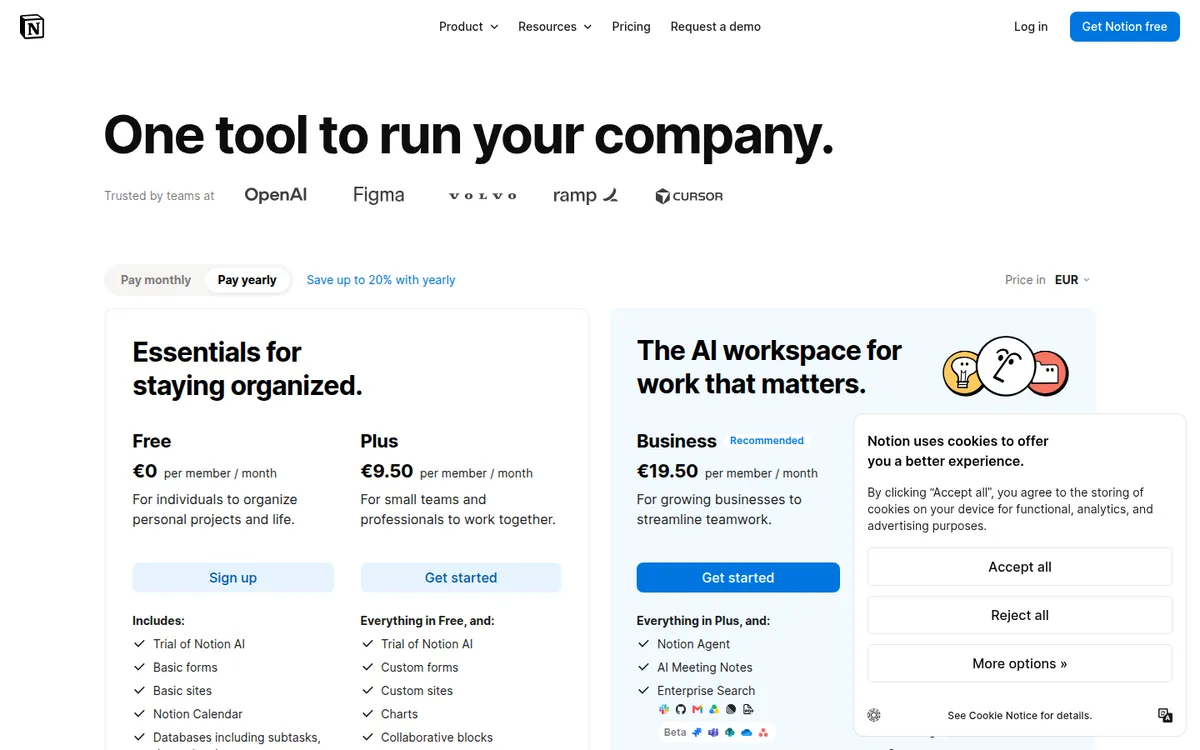
The pricing page now leads with "One tool to run your company" and AI: Notion Agent, AI meeting notes, enterprise search across connected apps, and Custom Agents that run tasks on their own. The Free plan also lists Notion Calendar and basic forms and sites.
Notion pricing in 2026
From our server, Notion's pricing page showed euros (€9.50 for Plus and €19.50 for Business per member per month on yearly billing). The US dollar prices below come from three independent guides from July to October 2026 (Carly, Breeze and Krater), which agree with each other. One older-looking guide listed different numbers ($12/$18), and we didn't use it.
| Plan | Per member, billed yearly | Per member, billed monthly | Key limits and features |
|---|---|---|---|
| Free | $0 | $0 | Unlimited blocks for 1 owner, 1,000 blocks once 2+ people join; 5 MB file uploads; 7-day page history; 10 guests; Notion AI trial |
| Plus | $10 | $12 | Unlimited blocks; 5 GB uploads; 30-day page history; custom forms and sites; charts; Notion AI trial only |
| Business | $20 | $24 | Adds Notion Agent, AI meeting notes, enterprise search and 90-day page history |
| Enterprise | Custom | Custom | Admin and security controls, zero data retention, custom page history |
The page says yearly billing saves "up to 20%." You pay per member. Guests, such as clients you share a page with, are free.
Students and teachers can get Plus free for a one-member workspace, per the pricing FAQ.
What a team of 2, 5 and 10 pays
This is our own math from the per-member prices above, before sales tax.
| Team size | Plus, yearly | Plus, monthly | Business, yearly | Business, monthly |
|---|---|---|---|---|
| 1 | $10 | $12 | $20 | $24 |
| 2 | $20 | $24 | $40 | $48 |
| 5 | $50 | $60 | $100 | $120 |
| 10 | $100 | $120 | $200 | $240 |
Unlike Asana or monday.com, Notion doesn't sell seats in blocks. A team of 6 pays for 6. The pricing FAQ says mid-cycle additions are prorated, and the seat count resyncs to your member count at each renewal.
The Notion Plus plan: what you get for $10
Plus is the plan most small teams should look at first. It removes the block cap, raises the upload limit from 5 MB to 5 GB per file, and keeps 30 days of page history. It adds custom forms, custom sites, charts and collaborative blocks.
What Plus doesn't include is full AI. On the pricing page, Free and Plus both list a "Trial of Notion AI." Breeze, a competing vendor, writes that "a trial is not an ongoing free allowance." Krater reports that Notion discontinued the old $10-per-member AI add-on, so a Plus team can't add AI on its own. To get Notion Agent and AI meeting notes, you move the whole workspace to Business.
Notion AI pricing: why AI now costs $20 a seat
On Business, AI is included with limits. Notion's help center says Business and Enterprise workspaces get monthly "Standard" and "Select" AI credits that reset at the start of each billing cycle and "don't roll over." Breeze lists the allowance as 1,500 Standard and 500 Select credits per member per month. We couldn't confirm those numbers on a Notion page.
Above that, there are Notion credits, a workspace balance that's off by default. The pricing page lists Custom Agents as "Free to try, then $10 per 1,000 monthly Notion credits." Notion's help center estimates that simple agent tasks use about 5 credits, medium tasks about 10 and complex ones about 25, and says actual use varies. Breeze reports that credits can only be bought on Business and Enterprise.
What this means in practice: a team of 5 that wants AI pays $100 a month on Business (yearly) instead of $50 on Plus. If you'd mainly use AI to summarize notes or draft text, compare that $50 difference with a standalone AI chat subscription before upgrading.
Is Notion free? The 1,000-block catch
Yes, with a catch for teams. Notion's help center says a Free workspace with only one member gets unlimited blocks. Once a workspace has 2 or more people, it gets 1,000 blocks, and "every piece of content you add is counted as a new block": each paragraph, checklist item, image or database row.
Three rules from the help center matter:
- Deleting doesn't help. Blocks are counted from everything created since signup. "Deleting blocks, or emptying the trash, will not reduce your block count."
- You can still edit. After you hit the cap, you can keep editing existing content but can't create new content without upgrading. Notion gives a three-day grace period.
- People on Free join as owners. The help center notes that people added to a Free workspace join as workspace owners, which is what triggers the multi-person cap.
A two-person team writing SOPs or meeting notes can use up 1,000 blocks in a few weeks. Treat the free plan as a solo tool or a short trial for a team.
Refunds, billing and cancelling
Notion's refund terms are clearer than most. Per the pricing FAQ:
- Monthly plans: full refund if you downgrade within 3 days of signing up.
- Yearly plans: full refund if you downgrade within 30 days.
- Members added by mistake: prorated refund if you contact Notion within 3 days of the invoice.
- Downgrades take effect at the end of the billing cycle.
- Failed payments may be retried up to 8 times in a month before the workspace is restricted and moved to Free.
The FAQ also says Notion won't use your data to train AI models unless you opt in.
What users praise
Notion is rated about 4.7 out of 5 on Capterra from roughly 2,700 reviews, and 79% of reviewers there are small businesses. The most consistent positives:
- Flexibility. Reviewers like building their own wiki, CRM or content calendar from pages and databases.
- One central hub. Teams say it replaces scattered docs, notes and spreadsheets.
- Real-time collaboration on shared pages.
- A clean interface once you're past the setup, plus a large community of templates.
What users complain about
Trustpilot gives Notion 2.2 out of 5 from about 440 reviews, and 44% are one-star. As with most business software, Trustpilot mostly collects billing and support problems.
- Billing. Reviewers describe charges after trials, trouble cancelling, and paying for extra AI credits on top of a plan.
- Support. Replies are described as email-only and slow, often 1 to 3 days. Trustpilot notes Notion hasn't replied to negative reviews.
- Speed with large databases. On Capterra and independent reviews, slow loading with big pages or databases with 1,000+ entries is the most frequent product complaint.
- Offline use. Notion's help center says you can view, edit and create pages offline in the desktop and mobile apps, but you choose which pages to download. Reviewers still call offline access unreliable, and it doesn't work in the browser.
- Learning curve. A blank workspace can be overwhelming, and setting up a useful system takes time.
Notion alternatives for small teams
| Tool | Entry paid price | Free plan | Pick it if… |
|---|---|---|---|
| Notion Plus | $10/member (yearly) | Yes, unlimited for 1 person, 1,000 blocks for teams | You want docs, a wiki and simple databases in one place |
| ClickUp Core | $9/user (yearly) | Yes | You mainly manage tasks and want docs on the side |
| Asana Starter | $10.99/user (yearly), 2-seat minimum | Yes, 2 users | You run projects with owners, deadlines and timelines |
ClickUp and Asana prices are from their own pricing pages as checked for our recent reviews.
Notion vs ClickUp. Notion is a document-first workspace where tasks are one kind of database. ClickUp is task-first, with docs added on. If your day is assigning work and tracking deadlines, ClickUp fits better. If it's writing SOPs and keeping a wiki, Notion does. We use ClickUp for our own content calendar; see how we use ClickUp as a solo operator and our ClickUp vs monday.com comparison.
Notion vs Asana. Asana is a dedicated project manager with timelines, dependencies and workload views. Notion can imitate that with databases, but you build it yourself. See our Asana pricing review.
Notion vs Obsidian. Obsidian stores notes as files on your own device, so it works fully offline. It's built for personal notes more than shared team wikis. Pick it if offline access matters more than collaboration.
Who Notion fits
- Solo operators who want a free, unlimited notes and planning space.
- Small teams of 2 to 10 who need SOPs, a wiki and simple databases at $10 a member.
- Agencies and freelancers who share pages with clients as free guests.
Who should skip it
- Teams that want project management out of the box. Asana or ClickUp need less setup.
- Anyone who needs dependable offline access, such as field teams with poor signal.
- Teams of 2 or more planning to stay on Free. The 1,000-block cap arrives fast.
- Plus teams that mainly want AI. You'll pay Business prices for it.
Is Notion worth it?
For a small team that wants one home for its docs, processes and light tracking, yes, on Plus. At $10 a member on yearly billing, with no seat blocks and a 30-day refund window on yearly plans, it's a low-risk buy. Business at $20 makes sense only if the team will use the AI features every week.
Before you pay:
- Start solo on Free to build your structure, then invite the team when you upgrade.
- Pick yearly billing only after a trial run, and remember the 30-day refund window.
- Decide whether you need AI before choosing between Plus and Business.
- Test a large database on the devices your team uses, since speed is the top complaint.
- Set a cap on Notion credits if you turn on Custom Agents.
FAQ
How much does Notion cost per month?
Per member, Plus is $10 billed yearly or $12 billed monthly. Business is $20 or $24. Enterprise is priced by quote.
Is Notion free?
Yes. The Free plan has unlimited blocks for one person. Workspaces with 2 or more people are limited to 1,000 blocks, plus 5 MB file uploads and 7 days of page history.
Does the Notion Plus plan include AI?
No. Plus includes only a trial of Notion AI. Full AI, including Notion Agent and AI meeting notes, comes with Business and Enterprise.
Is Notion AI free?
Only as a limited trial on Free and Plus. On Business, AI is included with monthly credit limits, and extra Notion credits cost $10 per 1,000.
Can I get a refund from Notion?
Yes, within limits. The pricing FAQ offers a full refund if you downgrade within 3 days on monthly billing or 30 days on yearly billing.
Disclosure: if you buy through our links we may earn a commission. It never changes our verdict. Details.
Sources
- Notion pricing page (plans, limits, AI credits, refund and billing FAQ)
- Notion Help Center: Understanding block usage
- Notion Help Center: Custom Agent pricing
- Notion Help Center: Working offline in Notion
- Carly: Notion pricing (July 15, 2026)
- Breeze: Notion AI pricing in 2026 (competing vendor, September 10, 2026)
- Krater: Notion AI pricing 2026 (pricing page read October 3, 2026)
- Notion reviews on Trustpilot
- Notion reviews on Capterra (rating via indexed listing)
- ClickUp pricing page
- Asana pricing page
Prices and features checked on November 2, 2026. Vendors change plans often, so confirm on the official site before buying.