

Our verdict
A strong all-in-one pick if you want to collect emails, send campaigns and build pages without owning a separate website. The features that make it stand out (website builder, lead scoring, Facebook ads) sit on the mid and upper plans, so check the plan grid before you buy.
- Best for
- Small businesses and creators who want email, landing pages, signup forms and a simple website in one tool
- Skip if
- Very small lists on a tight budget who only need a newsletter, or teams that need a full-featured website or online store
- Price
- 14-day free trial; Starter from about $19/month (1,000 contacts), Marketer from about $59, Creator from about $69; 18% off yearly
What works
- Landing pages, signup forms and popups on every paid plan, plus a website builder on Creator and up
- Contact scoring and unlimited automation workflows from the Marketer plan
- Create Facebook ads from inside the account and send traffic to your own landing pages
- Unlimited monthly email sends on all paid plans; 14-day trial with no credit card
What doesn't
- Starter is limited to one custom automation workflow and has no scoring, Facebook ads or website builder
- Billing uses your peak contact count and counts the same address once per list
- Recurring Trustpilot complaints about upfront annual charges, refunds and cancelling
- Reviewers call the website builder basic and the page editors fiddly
Our founder has used GetResponse for email campaigns and rates it highly. What they value most is that you don't need your own website to get started: GetResponse comes with its own landing page and website builder with ready-made templates, so you can collect emails, send campaigns, score your contacts and even run Facebook ads from one account.
That's the hands-on part of this review, and we'll keep it to that. We don't have the plan, list size or campaign numbers from that use, so we won't make any up. Everything else here (prices, plan limits, how billing works, what other users report) comes from GetResponse's own pages and public reviews, listed at the end.
What GetResponse is
GetResponse is an email marketing platform that has grown into a broader marketing suite. On top of newsletters and automated emails, it includes:
- Landing pages, signup forms and popups to collect email addresses
- A website builder with templates and an AI setup wizard
- Marketing automation, including tagging and contact scoring
- Paid ads, so you can create Facebook ads from inside the account
- Webinars, online courses and paid newsletters on the Creator plan
The pitch is one login for the whole path from "stranger sees an ad" to "subscriber buys something."
What our founder likes about it
You don't need a website first. This is the point our founder comes back to. Many email tools assume you already have a site where you'll embed a form. With GetResponse you can build a landing page or a simple site from a template and start collecting emails the same day. Landing pages are on every paid plan, according to the pricing page. The full website builder needs the Creator plan or higher (up to 5 sites on Creator, 10 on Enterprise).
Capture, then send. Forms and landing pages feed contacts straight into your lists. From there you send campaigns or set up automated sequences, starting with a welcome series, which is included on every plan.
Lead scoring. GetResponse lets you score contacts based on what they do. The help center describes a Score action in automation workflows: you can add or subtract points when someone clicks a link (or doesn't), set an exact score, or reset it. There are ready-made templates such as a "basic scoring plan" and one that tags contacts once they reach a score threshold. That lets you treat your most engaged subscribers differently from people who never open anything. Separately, there's an automatic Engagement Score that rates contacts on a five-step scale based on their email activity.
Facebook ads from the same place. You can connect a Facebook Ads account, then create an ad inside GetResponse (images, carousel or video, text, headline, button) and point it at one of your GetResponse landing pages or any URL. The help center notes that you need admin access to a Facebook Page and a card on your Facebook ad account, and that Facebook, not GetResponse, charges you for the ad spend.
Put together, that's the workflow our founder liked: an ad brings people to a landing page, the page collects the email, automation scores and follows up, and campaigns go out from the same account.
One caution: per the pricing page, scoring and Facebook ads start on Marketer, and the website builder starts on Creator. If those are the features you want, Starter won't cover them.
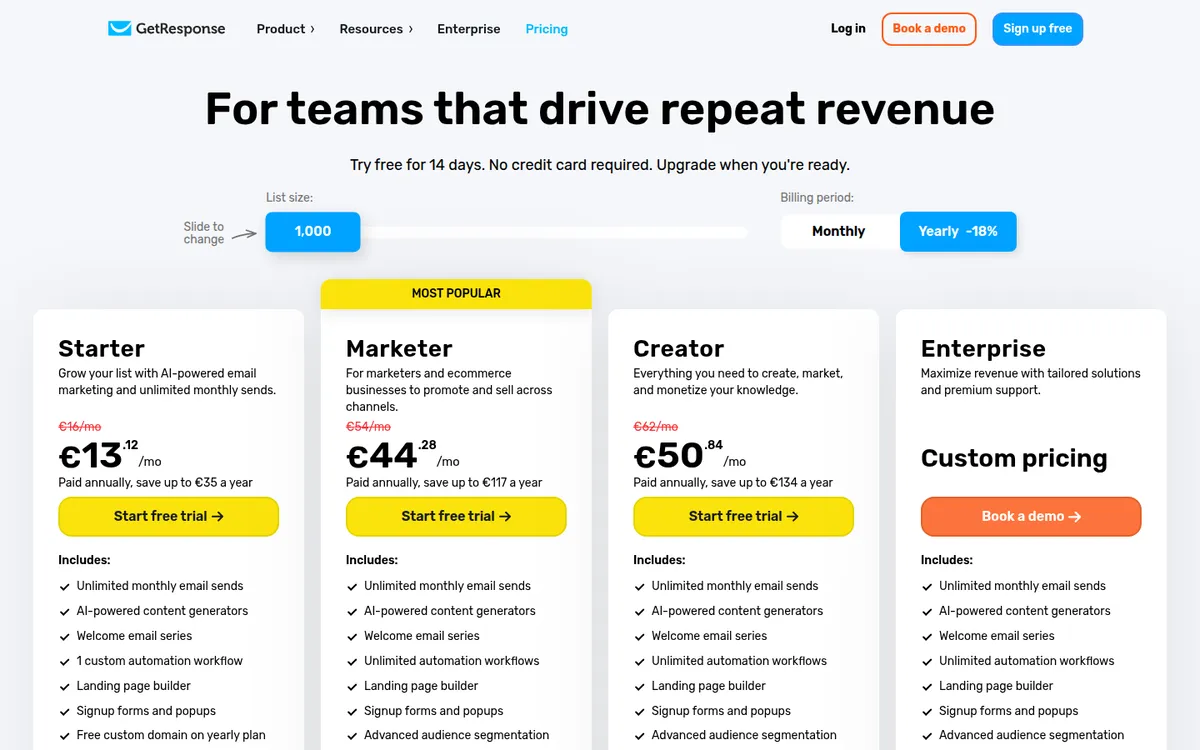
GetResponse pricing
GetResponse's pricing page shows prices in the visitor's local currency. When we checked it on October 25, 2026, it showed euros. Independent sources from 2026 (Style Factory, SendX) list the US prices below, which line up with the euro amounts. Taxes are extra.
| Plan | Monthly price (1,000 contacts) | Users | Automation | Key extras |
|---|---|---|---|---|
| Free trial | $0 for 14 days | No credit card required | ||
| Starter | about $19 | 3 | 1 custom workflow | Landing pages, forms, popups, unlimited sends |
| Marketer | about $59 | 5 | Unlimited workflows | Contact scoring, tagging, Facebook ads, ecommerce tools |
| Creator | about $69 | 5 | Unlimited workflows | Website builder (5 sites), webinars (100 attendees), courses, paid newsletters |
| Enterprise | Custom | Unlimited | Unlimited workflows | SMS, transactional email, dedicated IP, SSO, phone support |
- Yearly billing saves 18%, paid upfront.
- Bigger lists: the price rises with your contact count. At 100,000 contacts, Style Factory lists $539 (Starter), $599 (Marketer) and $690 (Creator) a month. Above 100,000 contacts the help center lists a charge of $4 per extra 1,000 contacts.
- Nonprofits get 50% off monthly plans, according to the pricing page.
- After the trial, premium features switch off and the account drops to a limited free version. The pricing page lists some of those limits (GetResponse badge on emails, landing pages capped at 1,000 unique visitors a month) but not a contact cap. Third-party reviews put it at around 500 contacts and 2,500 emails a month, which we couldn't confirm on GetResponse's site.
How billing actually works
This catches people out, so read GetResponse's own help article before you choose a tier. It says you're billed on:
- The peak number of active subscribers during the billing month, not your count on the billing date.
- The total number of contacts added during the month, "regardless of what happens to those contacts after they are added." Deleting and re-importing contacts counts again.
Each list is also counted separately. If the same email address is on three lists, it counts as three contacts. If you organize subscribers into many lists, consider tags or segments within one list instead.
Deliverability
GetResponse says its overall deliverability rate is 99%. Style Factory's July 2026 review reports results of 98.5% or higher in its own tests, and notes that custom DKIM is available on every plan. Enterprise adds a dedicated sending IP.
User reviews are more mixed. Some people say their delivery and open rates improved after switching to GetResponse. Others report emails landing in spam. As with any email tool, a lot depends on your list quality and domain setup (SPF, DKIM and DMARC), so set those up from day one.
What other users say
Across review sites the picture is broadly positive:
- Trustpilot: 4.2 out of 5 from about 1,040 reviews when we checked. About 65% are 5-star and 26% are 1-star.
- G2: about 4.3 out of 5 from more than 1,100 reviews.
- Capterra: about 4.2 out of 5 from more than 500 reviews.
Patterns in the praise: an interface beginners find easy, helpful and patient support, and a lot of features for the price.
Patterns in the complaints: almost all of them are about money and leaving rather than the product itself. Reviewers describe annual plans charged upfront with no refund, charges they didn't expect after trying to cancel, disputes over contact counts, and accounts put on hold. GetResponse's help center says continued charges usually mean the cancellation steps weren't all completed. If you cancel, follow every step and keep the confirmation.
Product complaints that come up: the landing page and form editors can feel fiddly, the website builder is basic (Style Factory found weak mobile speed scores and no obvious way to add products to a store), and webinar recording storage is limited to 3 hours on Creator.
Who GetResponse is for
Good fit:
- Solo founders and small businesses that don't have a website yet, or don't want to wire a form into one
- Marketers who want lead scoring and automation without paying for a heavier tool
- Anyone who wants to run Facebook ads and send traffic to their own landing pages from one account
- Coaches and creators who want webinars and courses next to their email list (Creator plan)
Not a good fit:
- Tiny lists on a tight budget. If you only need a simple newsletter, a free plan elsewhere (for example Brevo or Kit) may be enough.
- Anyone who needs a full website or store. The builder works for simple sites, but it's no replacement for a dedicated website platform.
- People who organize contacts into many separate lists, because duplicates count toward your bill.
- Buyers who want scoring or ads on the cheapest plan. Those need Marketer or higher.
How to try it without surprises
- Start the 14-day free trial. No credit card is needed.
- Build one landing page and one welcome email during the trial to see if the editors suit you.
- Check which features you used. If you touched scoring, ads or the website builder, you'll need Marketer or Creator.
- Pay monthly first. Switch to yearly once you're sure, since reviewers report trouble getting refunds on annual plans.
- Keep your contacts in as few lists as possible to avoid paying for duplicates.
Our verdict
GetResponse earns its place for people who want one tool to collect emails, follow up automatically and send campaigns, especially if they don't have a website. That's exactly why our founder rates it: landing pages and a site builder with templates, lead scoring and Facebook ads all live in the same account.
Just pick your plan with care. The features that set GetResponse apart start on Marketer and Creator, billing follows your peak contact count, and the most common complaints are about annual charges and cancelling. If those points work for you, GetResponse is a strong all-in-one choice.
Disclosure: if you buy through our links we may earn a commission. It never changes our verdict. Details.
Sources
- GetResponse pricing page
- GetResponse pricing page (markdown version)
- GetResponse Help: How does GetResponse pricing work?
- GetResponse Help: What happens when I go over my list size limit?
- GetResponse Help: How to use the Score action?
- GetResponse Help: What is Engagement Score?
- GetResponse Help: How to create Facebook Ads in GetResponse?
- GetResponse: Website Builder
- Style Factory: GetResponse review (July 2026)
- SendX: GetResponse pricing
- GetResponse reviews on Trustpilot
- GetResponse reviews on Capterra
- GetResponse reviews on G2
Vendors change plans often, so confirm on the official site before buying.