

Our verdict
CallRail does one job well: it shows which ad, keyword or listing made the phone ring. For a local business that spends real money on ads and gets most leads by phone, $50 to $95 a month is easy to justify. The catch is the bill: minutes, numbers, texts and AI minutes over the allowance are all extra, and an annual plan can't be cancelled early. If you get few calls or don't run paid ads, you probably don't need it.
- Best for
- Local service businesses and the agencies that run their ads, where phone calls are the main source of leads and ad spend is large enough to need attribution
- Skip if
- Businesses that get few calls, don't advertise, or need a full business phone system; anyone who wants a fixed, predictable bill
- Price
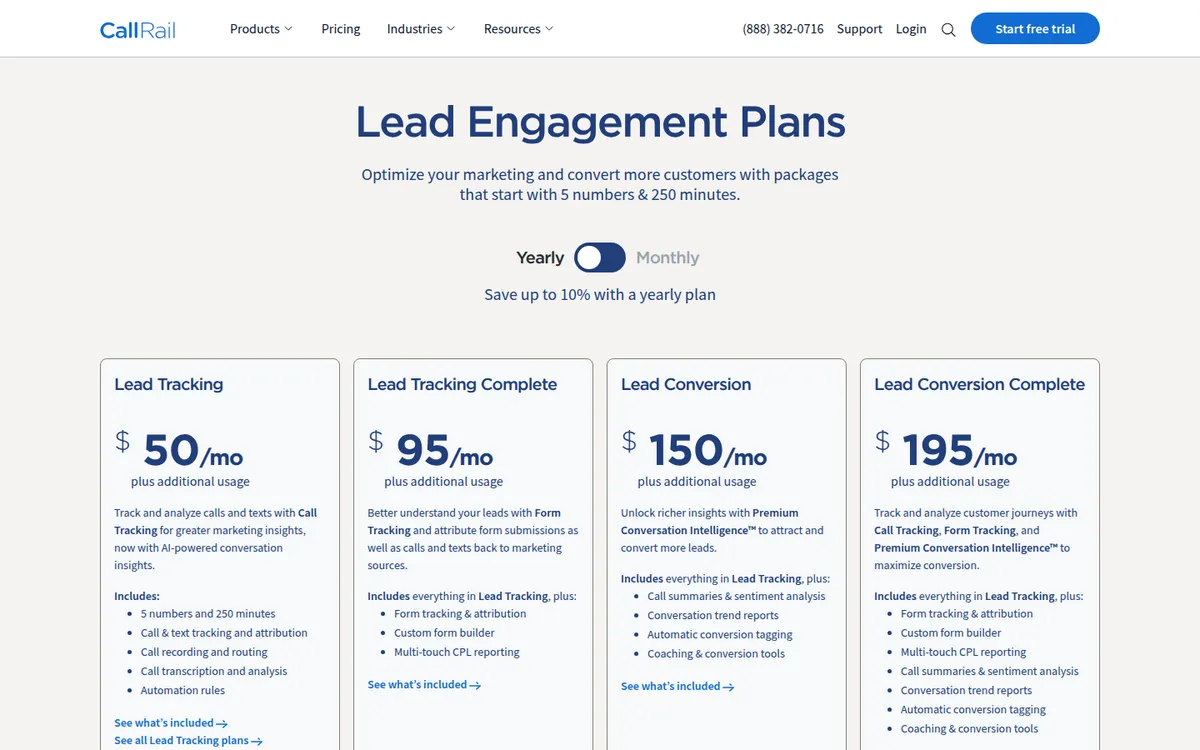
- Lead Tracking $50/month, Lead Tracking Complete $95, Lead Conversion $150, Lead Conversion Complete $195 (prices shown with yearly billing; month-to-month runs about 10% higher, around $55 to $215, per a third-party check). Each includes 5 local numbers, 250 local minutes and 25 texts; extra usage billed on top. 14-day free trial, no card. No free plan
What works
- Shows which campaign, keyword or page drove each call, and sends that data to Google Ads and GA4
- 14-day free trial with no credit card required
- Call recording, routing, transcription and automation rules are on the entry plan
- Strong review scores: about 4.5 on G2 and Capterra, with support often praised
What doesn't
- Every extra minute, number, text and AI minute is billed on top, and calls are rounded up to the next minute
- Annual plans can't be cancelled or switched to monthly until the term ends
- Form tracking costs $45 more a month; AI call summaries need the $150 tier
- Negative reviews center on surprise overage bills and refused refunds
We have not used CallRail. This look at CallRail pricing is built from CallRail's own pricing page and help center (read on November 9, 2026), an October 2026 third-party price check, public reviews on G2, Capterra and Trustpilot, and competitors' pricing pages. Where a number is our own math or comes from a third party, we say so. Sources are listed at the end.
The short version: CallRail starts at $50 a month with yearly billing, which buys 5 tracking numbers and 250 minutes. Most small businesses will pay more than that, because extra minutes, numbers and texts are billed on top. Whether that's worth it depends on one question: how much of your ad budget turns into phone calls?
What CallRail does
CallRail is call tracking software. It gives you phone numbers to place on your ads, website, Google Business Profile or flyers. When someone calls, CallRail forwards the call to your real phone and records which source the caller came from.
On your website, it can swap the number each visitor sees (dynamic number insertion). That lets it tie a call to the exact Google Ads keyword, campaign or page the visitor arrived from. It then sends that data back to tools like Google Ads and GA4, so phone leads count as conversions.
On top of tracking, the entry plan includes call recording, call routing, transcription and automation rules, according to the pricing page. Higher plans add form tracking and AI analysis of calls.
CallRail pricing in 2026: the four plans
CallRail sells four main plans. The pricing page shows the prices below with the yearly billing toggle selected and says yearly plans save "up to 10%". It doesn't show month-to-month prices in its page text, so the monthly column comes from a third-party check done in October 2026.
| Plan | Yearly billing (per month) | Monthly billing (third-party) | What it adds |
|---|---|---|---|
| Lead Tracking | $50 | about $55 | Call and text tracking, recording, routing, transcription, automation rules |
| Lead Tracking Complete | $95 | about $105 | Form tracking, custom form builder, multi-touch cost-per-lead reports |
| Lead Conversion | $150 | about $165 | AI call summaries, sentiment analysis, trend reports, automatic conversion tagging |
| Lead Conversion Complete | $195 | about $215 | Everything above |
Every plan includes 5 local numbers, 250 local minutes and 25 texts a month, then "plus additional usage". Complete plans include 1,000 form submissions. Lead Tracking plans include 250 transcription minutes; Conversion plans include 10,000.
There is no free plan. Each plan has a 14-day free trial, no credit card required, and billing starts when the trial ends, according to the pricing page.
What the overages cost
This is where the real bill comes from. The pricing page lists these usage rates:
| Extra usage | Price |
|---|---|
| Local number | $3 a month each |
| Local minute | $0.05 each (one table on the same page says $0.06) |
| Toll-free number | $5 a month each |
| Toll-free minute | $0.08 each |
| Text message | $0.03 each |
| Form submission (Complete plans) | $0.02 each |
| Transcription minute | $0.025 (Tracking plans) or $0.04 (Conversion plans) |
| AI analysis minute (Conversion plans) | $0.04 (another table says $0.05) |
Two billing details matter. First, each call is rounded up to the next full minute before minutes are added up, per CallRail's billing FAQ. A 61-second call counts as two minutes. Second, CallRail keeps routing calls after you pass your allowance and bills the extra, as its own blog explains. It has no hard cap, so a busy month shows up on the next invoice. CallRail's pricing page also says usage fees are non-refundable.
The page itself contradicts itself on a couple of rates. We list both where that happens; check the live page before you buy.
The AI Voice Assistant add-on
CallRail also sells an AI receptionist that answers calls. The pricing page lists it from $95 a month, and it requires a Lead Tracking plan, which takes the starting total to about $150. It includes 50 handled calls over 15 seconds, then $1 per extra call (one section of the page says 55 calls).
API fees
If you pull data through the API, the first 1,500 calls a month are free. From 1,501 to 12,000 calls it's $80 a month, and up to 300,000 calls it's $200 a month. Most small businesses using built-in integrations won't hit this.
What CallRail costs for a real small business (our math)
The base price only tells part of the story. Here are three example setups using the pricing page rates. They are our own estimates, not quotes, and they assume yearly billing and local minutes at $0.05 to $0.06.
| Example | Plan | Usage over allowance | Estimated monthly total |
|---|---|---|---|
| Handyman, Google Business Profile + one Google Ads campaign, ~200 minutes | Lead Tracking ($50) | None | about $50 |
| Plumber, 8 numbers (ads, GBP, website pool, van wraps), ~600 minutes | Lead Tracking ($50) | 3 numbers ($9) + 350 minutes ($17.50 to $21) | about $77 to $80 |
| Dental office, 12 numbers, ~1,200 minutes, form tracking | Lead Tracking Complete ($95) | 7 numbers ($21) + 950 minutes ($47.50 to $57) | about $164 to $173 |
The number count adds up faster than people expect. To track individual website visitors, CallRail's help center says your number pool should be about a quarter of your peak hourly visitors, with a minimum of four numbers. A site with 40 visitors in its busiest hour needs about 10 pool numbers, which is already 5 over the allowance before you add numbers for ads or offline sources.
CallRail also sells higher-volume minute bundles (750, 1,000 and 4,000 minutes) that include more numbers and lower rates, according to the same third-party check. If your estimate is far above 250 minutes, ask about those before signing.
Annual plans: read this before you commit
Yearly billing saves up to 10%, but CallRail's own help center is clear about the trade-off: once you switch to an annual plan, you can't switch back to monthly or cancel until the annual period ends. Usage over the allowance is still billed monthly.
When you do close an account, CallRail's help center says it is marked as scheduled to close rather than shut down right away. The base plan is paid through the end of the billing cycle, so you can still pull reports until then. If you have tracking numbers you want to keep, CallRail has a separate process for porting them out; do that before closing.
Our suggestion: run the free trial, then pay monthly for two or three months until you know your real minute and number usage. Only then decide whether the 10% saving is worth a 12-month lock-in.
Is CallRail legit? What users praise
CallRail is a long-running, widely used product with solid review scores:
- G2: about 4.5 out of 5 from roughly 1,650 to 1,800 reviews (the count varies by page), and listed as a Leader in G2's inbound call tracking category.
- Capterra: about 4.5 out of 5 from around 170 reviews.
- Trustpilot: 3.5 out of 5 from 488 reviews, although 81% are 5-star. Trustpilot notes CallRail hasn't been inviting reviews recently and shows only one review in the last 12 months, so the page leans on older reviews.
Patterns in the positive reviews:
- Attribution that works. Reviewers like finally seeing which campaigns produce calls, not just clicks.
- Support. On Trustpilot in particular, the most common praise is for friendly, knowledgeable support.
- Easy setup for basic tracking, and useful integrations with Google Ads and analytics tools.
- AI call summaries come up in recent 2026 G2 reviews as a time saver.
What users complain about
- Surprise overage bills. The most common complaint across Trustpilot and G2 is usage billing. One November 2025 Trustpilot reviewer says minutes over the plan were billed without warning.
- Cancellation and refunds. A June 2026 Trustpilot reviewer says refunds on an annual plan were refused and that the terms weren't clear upfront. A January 2025 reviewer describes trouble cancelling. CallRail replies to all negative Trustpilot reviews, typically within 48 hours.
- Learning curve. Some G2 reviewers find the interface complex once you go past basic tracking.
- Spam calls and integrations. Spam calls eating minutes, plus occasional integration problems (one 2026 review mentions a Google Ads conversion issue), show up in negative reviews.
CallRail vs WhatConverts and CTM
| CallRail | WhatConverts | CTM (CallTrackingMetrics) | |
|---|---|---|---|
| Entry price | $50/month (yearly billing) | $30/month | about $79/month (per G2) |
| Included usage | 5 numbers, 250 minutes, 25 texts | $30 usage credit | Varies; usage extra |
| Extra local number | $3 | $2.50 | not confirmed |
| Extra local minute | $0.05 to $0.06 | $0.045 | not confirmed |
| Form tracking | From $95/month | From $60/month (Plus) | Varies by plan |
| Free trial | 14 days, no card | 14 days | Sources disagree |
WhatConverts prices come from its pricing page; CTM's own pricing page didn't load for us, so its figures come from G2's listing and should be checked with CTM.
Pick CallRail if you want the most established option, strong Google Ads integration and AI call analysis, and you're fine with usage billing.
Pick WhatConverts if you want calls, forms and chats in one lower-cost plan, or you're an agency that needs white-label reports.
Pick CTM if your team also handles sales calls at volume and wants the higher tiers' sales features (G2 lists plans named Marketing and Sales Engage), and you're willing to get a quote.
CallRail alternatives for small businesses
- WhatConverts: cheaper entry price and slightly lower usage rates. A good fit for tracking calls and forms together.
- CTM (CallTrackingMetrics): higher entry price, with tiers aimed at both marketing and sales teams; confirm current pricing directly.
- Google Ads call tracking: free Google forwarding numbers in your ads and call reporting inside Google Ads. It only covers Google Ads calls, but if that's your only paid channel, it may be enough.
- Your phone system's reports: if you only want to know call volume by number, your VoIP provider may already show that.
Who CallRail fits
- Local service businesses (home services, legal, medical, auto) where calls are the main lead source and ad spend runs into hundreds or thousands a month.
- Agencies that need to prove to clients which campaigns bring calls.
- Teams that want call recordings and AI summaries to coach staff or qualify leads.
Who should skip it
- Businesses with few calls or no paid advertising. Without ad spend to optimize, the attribution data doesn't change many decisions.
- Anyone who needs a full phone system. CallRail tracks and forwards calls; it isn't a replacement for a business phone service.
- Owners who need a fixed monthly bill. Usage pricing and minute rounding make the invoice vary month to month.
- Online-only stores where almost nobody calls.
Is CallRail worth it?
If a single booked job from a phone call is worth a few hundred dollars, and you're spending money on ads, CallRail's $50 to $95 a month usually pays for itself the first time it shows you a campaign that brings no calls. That's the main use case, and reviewers broadly agree it does this well.
It's less of a bargain if your call volume is high and your margins are thin, because overages scale with every minute. Estimate your monthly minutes and numbers before you sign, start with monthly billing, and avoid the annual plan until you know your usage.
FAQ
How much does CallRail cost per month?
Plans run $50, $95, $150 and $195 a month with yearly billing, per CallRail's pricing page. Month-to-month billing is about 10% more (around $55 to $215, according to an October 2026 third-party check). Extra minutes, numbers and texts are billed on top.
Does CallRail have a free trial?
Yes. Every plan has a 14-day free trial with no credit card required. There is no permanent free plan.
What happens if I go over 250 minutes on CallRail?
Calls keep going through, and the extra minutes are billed on your next invoice at about $0.05 to $0.06 per local minute. Each call is rounded up to the next full minute.
Can I cancel a CallRail annual plan early?
No. CallRail's help center says annual plans can't be cancelled or switched to monthly until the annual period ends.
Is CallRail better than WhatConverts?
CallRail has more reviews and stronger AI call analysis. WhatConverts starts cheaper ($30 a month) and includes forms and chats on lower tiers. For a single small business on a tight budget, WhatConverts is worth comparing first.
Disclosure: if you buy through our links we may earn a commission. It never changes our verdict. Details.
Sources
- CallRail: Pricing (read November 9, 2026)
- CallRail Help: Annual plans
- CallRail Help: Close my account
- CallRail Help: How to calculate the size of your website pool
- CallRail Help: Port a phone number away from CallRail
- CallRail blog: What happens if I use more minutes than I expect? (2013)
- Omid Saffari: CallRail pricing 2026 (monthly vs annual prices, checked October 2026)
- CallRail reviews on Trustpilot
- CallRail reviews on Capterra
- CallRail on G2
- G2 discussion: How do I cancel CallRail?
- WhatConverts: Pricing
- G2: CTM (CallTrackingMetrics) pricing
Prices and features checked on November 9, 2026. Vendors change plans often, so confirm on the official site before buying.