
Our verdict
A strong choice if design control matters and someone on your team will learn the editor. Budget for the monthly vs. yearly price gap, bandwidth add-ons and seats, and read the billing terms before paying for a year.
- Best for
- Design-led marketing sites, studios and small teams with a designer who wants full visual control without managing hosting
- Skip if
- Owners who want a site live this weekend with no learning curve, tight budgets, or businesses whose core is a large online store
- Price
- Free Starter plan; Basic $15/month yearly ($25 monthly); Premium $25/month yearly ($39 monthly); Ecommerce from $29/month
What works
- Visual control close to hand-coding, without writing code
- Hosting, SSL and backups are included in every paid Site plan
- Premium now includes 20,000 CMS items and 40 collections
- Free Starter plan lets you build and learn before paying
What doesn't
- Steep learning curve for non-designers, per many reviews
- Pricing is layered: Site plan, Workspace seats and add-ons
- Billing, refunds and support dominate negative reviews
- Code export skips CMS, ecommerce and localized content
We have not used Webflow on our own sites. This guide pulls together Webflow's own announcements and help articles, recent independent pricing breakdowns and public user reviews, so you can decide whether it's worth your time. Sources are listed at the end.
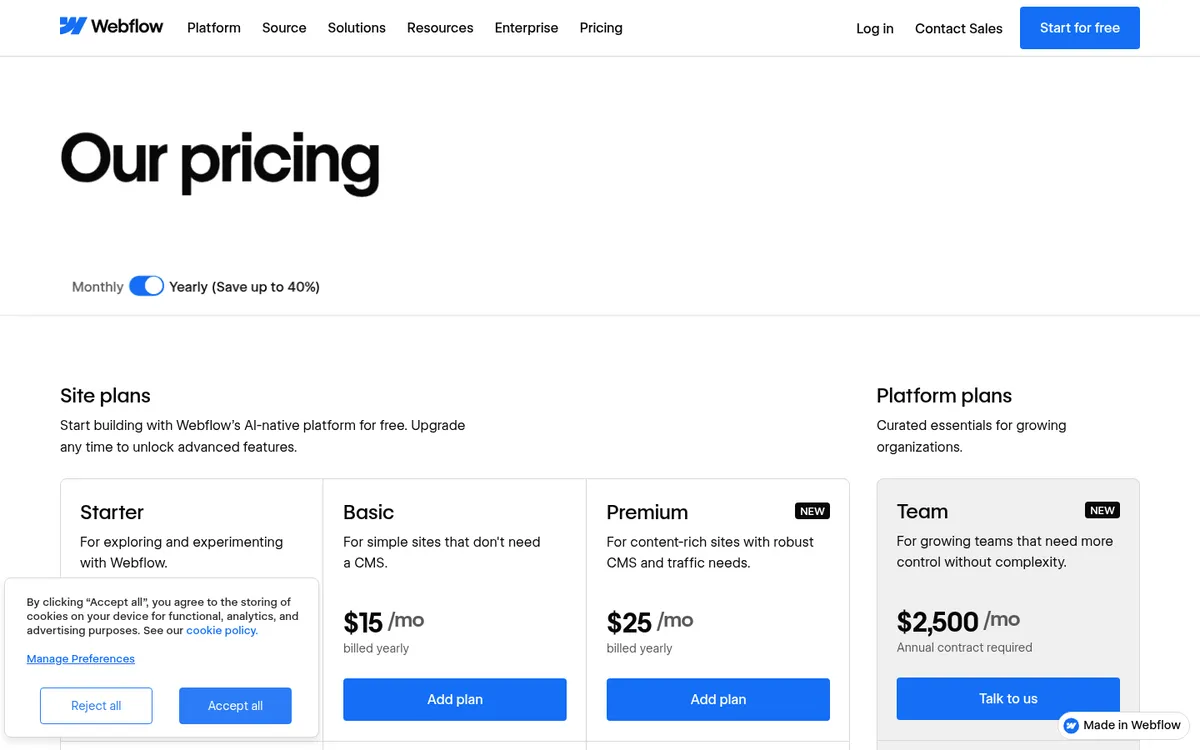
One note up front: Webflow's pricing page loads its details with JavaScript, so our text tools couldn't read it on October 25, 2026. A screenshot of the page that day shows the headline yearly prices ($15 Basic, $25 Premium, $2,500 Team). Plan limits and monthly prices come from Webflow's May 2026 announcement plus three independent breakdowns updated between May and October 2026 that agree with each other. Confirm on Webflow's site before you pay.
What Webflow is
Webflow is a visual website builder and hosting platform. You design pages on a canvas that maps directly to real HTML and CSS: boxes, grids, flexbox, classes and breakpoints. That's why designers like it, and also why beginners find it harder than drag-and-drop builders like Squarespace or Wix.
It also includes a CMS for blogs and other structured content, built-in hosting, forms, basic SEO controls, an ecommerce option, and a growing set of AI features.
What changed in May 2026
On May 13, 2026, Webflow simplified its Site plans. According to Webflow's help center and community announcement:
- The old CMS and Business plans were merged into one new Premium plan.
- CMS limits went up, and CMS item add-ons are no longer needed.
- A new Team plan sits between self-serve and Enterprise.
- Every Workspace plan now includes AI credits, which reset monthly on self-serve plans. Some AI features, such as AI-powered localization, use those credits.
Webflow says some customers will pay more, some less and some the same, and it offers a pricing calculator for existing sites.
If you already have a Webflow site, check your date. Most existing sites moved to the new pricing at their first renewal or billable change on or after June 29, 2026. Sites in Freelancer or Agency Workspaces, and sites on legacy pricing, move on or after November 16, 2026. Webflow says switching to yearly billing before your date keeps your current plan for one more year.
Pricing at a glance
Webflow charges in two layers. A Site plan pays for hosting and features on each site. A Workspace plan pays for the people who build and edit. A solo owner editing one site can often get by on a Site plan alone. Teams and freelancers usually need both.
Site plans (general websites)
| Plan | Billed yearly | Billed monthly | Key limits |
|---|---|---|---|
| Starter | Free | Free | webflow.io address only, 2 static pages, 50 CMS items |
| Basic | $15/month | $25/month | Custom domain, 300 static pages, 10 GB bandwidth, no CMS |
| Premium | $25/month | $39/month | 300 static pages, 20,000 CMS items, 40 collections, 50 GB bandwidth |
| Team | $2,500/month | Annual contract required | One site, 10 seats (5 full, 5 limited), 100 collections, Localization |
| Enterprise | Custom | Custom | Custom limits and contracts |
Premium also adds site search and form file uploads, according to BRIX Templates. Bandwidth can be raised with add-ons up to 2.5 TB. The first +50 GB add-on is listed at about $20/month yearly or $30/month monthly.
Ecommerce plans
| Plan | Price | Key limits |
|---|---|---|
| Standard | $29/month | 500 products, 2% Webflow transaction fee |
| Plus | $74/month | 5,000 products, no Webflow transaction fee |
| Advanced | $212/month | 15,000 products, no Webflow transaction fee |
Webflow said the ecommerce plans were not part of the May 2026 change. The sources we found list these as yearly-billing prices or don't say. Payment processor fees (Stripe or PayPal) apply on top.
Workspace plans and add-ons
Independent sources list paid Workspace plans for in-house teams starting around $19/month billed yearly, with extra full seats around $39/month. Freelancer and Agency Workspaces are priced separately. The paid add-ons listed include Localization (from $9/month per locale), Analyze (from $9/month) and Optimize (from $299/month).
What this means in practice: a simple five-page brochure site with a contact form fits Basic at $180 a year. Add a blog and you need Premium, which is $300 a year billed yearly or $468 a year billed monthly. Paying monthly costs about 56% more on both plans. Online stores use the separate Ecommerce plans, which come with their own CMS limits.
What users praise
Across Capterra reviews and review roundups, the positives are consistent:
- Design freedom. This is the top theme by a wide margin. Reviewers say they can build exactly what they designed, without fighting a template, and without writing code.
- Hosting in one place. You don't manage servers, plugin updates or security patches the way you would with self-hosted WordPress.
- Learning resources. Webflow University and the community forum get credit from reviewers who learned the tool from scratch.
- The CMS for marketing sites. Collections plus visual templates make blogs, case studies and directories manageable for non-developers once the site is built.
Capterra shows a large majority of positive reviews overall.
What users complain about
- The learning curve. It's the most common complaint on Capterra. Even people comfortable with design tools say it takes time. Webflow assumes you understand how web layouts work.
- Pricing. Reviewers call the plan structure confusing and expensive for small businesses. Site plans, Workspace seats, bandwidth and add-ons are separate charges, and several reviews and blog roundups describe the May 2026 change as a price increase for former CMS-plan users.
- Billing, refunds and support. Webflow's Trustpilot page is overwhelmingly negative, with a TrustScore of 1.4 from about 240 reviews when we checked. The recurring themes are non-refundable annual plans, renewals people didn't expect, sites going offline after a lapsed payment, and difficulty reaching a human through support. Trustpilot reviewers skew toward people with problems, so read this as a list of risks rather than a typical experience.
- Complex builds feel clunky. Some reviewers mention slowdowns in the editor and class changes that ripple across the site unexpectedly.
Lock-in: what you can take with you
Webflow's help center says code export is available on paid Workspace plans, not on Site plans alone. The export includes HTML, CSS, JavaScript and assets.
It does not include CMS content, user accounts, ecommerce data, code components or localized content. Collection pages export empty. If a blog or product catalog is central to your site, moving off Webflow later means rebuilding that content somewhere else.
Who Webflow fits
- Design-led businesses (studios, consultants, startups, agencies) that care how the site looks and want to change it without a developer.
- Marketing teams that publish landing pages and blog posts often and want them on-brand every time.
- Freelance designers building sites for clients who will edit content afterward.
- Anyone who wants hosting, SSL and backups handled and is willing to pay a monthly fee for that.
Who should look elsewhere
- Owners who want a site up fast with no learning curve. Squarespace or Wix are easier to pick up for a simple business site.
- Tight budgets or content-heavy sites. Self-hosted WordPress costs more time but can cost less money, and it doesn't lock your content in. You'll handle updates and security, or pay a managed host to do it.
- Stores that are the main business. Webflow Ecommerce works for small catalogs, but a dedicated platform like Shopify has a much deeper app ecosystem, payments and inventory tools.
- Anyone uneasy with annual prepayment. Given the billing complaints, consider paying monthly until you're sure, even though it costs more.
Bottom line
Webflow gives you more design control than any mainstream no-code builder, and the May 2026 change made the Premium plan more generous on CMS limits. The trade-offs are a real learning curve, layered pricing and a mixed reputation on billing and support.
Start on the free Starter plan and build one real page. If it clicks and you need a custom domain, Basic at $15/month yearly is a low-risk step. Before you commit to a yearly plan, read Webflow's refund terms, check your bandwidth needs against Premium's 50 GB, and decide now whether you'll ever need to move your CMS content out.
Disclosure: if you buy through our links we may earn a commission. It never changes our verdict. Details.
Sources
- Webflow pricing page
- Webflow Help Center: Updated pricing and simplified plans for May 2026
- Webflow Community: Updates to Webflow plans and pricing
- Webflow Help Center: How do I export my Webflow site code?
- Digidop: Webflow, a complete guide to 2026 pricing
- Digidop: Webflow pricing update in May 2026
- BRIX Templates: Webflow May 2026 pricing changes explained
- Activepieces: Webflow pricing 2026, plans, seats and real costs
- Webflow reviews on Capterra
- Webflow reviews on Trustpilot
- Taskade: Webflow review 2026
Prices and features checked on October 25, 2026. Vendors change plans often, so confirm on the official site before buying.