
Our verdict
The safe default for U.S. small businesses: most accountants know it, it connects to almost everything, and it scales from one owner to 25 users. You pay for that. List prices run $38 to $340 a month, the 50% discount lasts only three months, and Intuit raised Essentials, Plus and Advanced again in August 2026.
- Best for
- U.S. small businesses that work with an outside accountant or bookkeeper, need inventory, classes or project tracking, or plan to add payroll in the same system
- Skip if
- Very small businesses watching every dollar, teams that want many users without paying per tier, and anyone who resents yearly price increases and upsells
- Price
- Free plan (very limited); Simple Start $38/month, Essentials $85, Plus $140, Advanced $340 at list price; new customers get 50% off for 3 months or a 30-day free trial
What works
- Most U.S. accountants and bookkeepers already know it, and Simple Start includes access for 2 accountants
- Scales from 1 user to 25 users without switching software
- Inventory, budgets, classes, locations and project profitability on Plus and Advanced
- Payroll, payments and bill pay plug into the same books
What doesn't
- The 50% discount ends after 3 months, then the price doubles
- Essentials, Plus and Advanced went up again for renewals from August 1, 2026
- User limits push growing teams to pricier plans (1, 3, 5 or 25 users)
- Reviewers report glitches, bank-feed and integration problems, and uneven support
We have not used QuickBooks Online for our own books. This guide to QuickBooks Online pricing is built from Intuit's pricing, payments and payroll pages, its help center, public reviews on Capterra and Trustpilot, and independent coverage, all checked on October 26, 2026. Sources are listed at the end.
The short version: QuickBooks Online is the accounting software most U.S. accountants expect you to use. The price on the plan cards is a three-month promo. Budget for the full list price, and for another increase next year.
What QuickBooks Online is
QuickBooks Online is Intuit's cloud accounting software. You connect your bank and card accounts, categorize transactions, send invoices, pay bills, track sales tax and run reports like profit and loss and balance sheet. It runs in a browser and on a mobile app.
Intuit sells it in tiers. Each one adds users and features on top of the one below. Payroll, card processing and bookkeeping help are sold as add-ons.
QuickBooks Online pricing in 2026: every plan
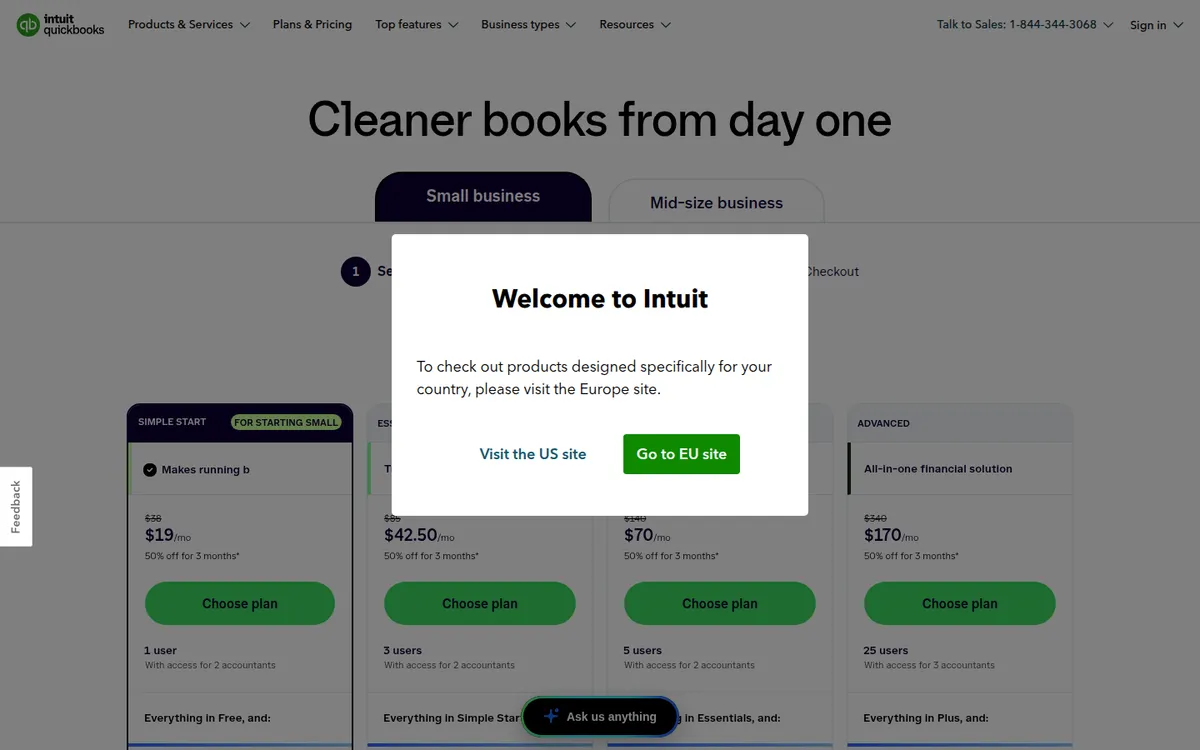
These are the U.S. prices on Intuit's pricing page on October 26, 2026. New customers see 50% off for the first three months. The page also offers a 30-day free trial. We couldn't read the offer's fine print, so check at checkout whether you can combine the two.
| Plan | List price | Promo (first 3 months) | Users | Accountant seats | What it adds |
|---|---|---|---|---|---|
| Free | $0 | — | 1 | None | Income and expense tracking, 2 invoices a month, 3 reports, 1 bank connection |
| Simple Start | $38/month | $19/month | 1 | 2 | Unlimited invoicing, bill pay, expense categorization, general reports, onboarding help |
| Essentials | $85/month | $42.50/month | 3 | 2 | Enhanced reports, quarterly tax estimates, employee time on invoices, AI books cleanup |
| Plus | $140/month | $70/month | 5 | 2 | Inventory, budgets, project profitability, 40 classes and locations, anomaly checks |
| Advanced | $340/month | $170/month | 25 | 3 | Custom dashboards, user permissions, workflow automation, Excel sync, batch invoices, priority support |
Intuit marks Plus as the "customer favorite." The page says there's no annual contract and you can switch plans or cancel at any time.
What you pay in year one
Because the discount lasts only three months, your first-year cost is much closer to full price than the plan cards suggest:
- Simple Start: 3 × $19 + 9 × $38 = $399
- Essentials: 3 × $42.50 + 9 × $85 = $892.50
- Plus: 3 × $70 + 9 × $140 = $1,470
- Advanced: 3 × $170 + 9 × $340 = $3,570
From year two, multiply the list price by 12. Plus, for example, becomes $1,680 a year before add-ons.
The August 2026 price increase
Intuit raised monthly prices on Essentials, Plus and Advanced for renewals on or after August 1, 2026, according to Insightful Accountant and SWK Technologies. Free, Simple Start and Intuit's other entry plans were not part of that change. Promo pricing runs until the promotion ends, and the new price applies at each subscription's next billing date.
Third-party guides disagree on the exact "before" prices, so we've left them out. The pattern matters more: QuickBooks Online has gone up regularly, and NerdWallet notes that price hikes and upselling are a common complaint. Assume your price will rise again.
Payment, payroll and bookkeeping add-ons
QuickBooks Payments has no monthly fee. The rates page lists:
| Payment type | Fee |
|---|---|
| Invoiced cards, Apple Pay, PayPal, Venmo | 2.99% |
| Card swiped or tapped in person | 2.5% |
| Card keyed in by hand | 3.5% |
| ACH bank transfer | 1% |
| Instant deposit | 1.75% |
Payroll is sold as a bundle with the accounting plan. The payroll page lists Workforce Payroll + Simple Start at $88 a month plus $6.50 per employee, Payroll + Essentials at $125 plus $6.50 per employee, and Workforce Premium + Plus at $203 plus $10 per employee. The base price is half off for three months. Premium adds time tracking and HR tools. With five employees on the Simple Start bundle, you'd pay about $120.50 a month at full price.
Live Bookkeeping (Intuit Expert full-service bookkeeping) is offered at checkout, but the pricing page doesn't show its price. Third-party guides list figures from roughly $200 to $700 a month based on your monthly expenses, plus a cleanup fee, and they don't agree with each other. Get a quote before you count on it.
QuickBooks Online Simple Start vs the Free plan
Simple Start is the plan most people search for, and for good reason. It's the cheapest full version.
QuickBooks Free, added in 2026, is a much smaller product. According to Intuit's page and Fit Small Business, it allows one user, one bank connection, two invoices a month (unlimited if you turn on QuickBooks Payments), one estimate, two receipt captures and five mileage trips a month, and three reports. Your accountant can't be added to the file. Your data carries over if you upgrade.
Free works for a one-owner side business with one bank account and a handful of transactions. Once you have an accountant, or more than a few invoices without card processing, Simple Start is the real starting point.
The jump from Simple Start to Essentials is the one to watch. Simple Start allows only one user. Adding a second person who isn't your accountant means paying $85 a month instead of $38.
QuickBooks Online free trial
Intuit lists a 30-day free trial, with phone support included during the trial on Simple Start and above. Use it to connect your real bank account and run one month of transactions. That shows you quickly whether the bank feed and categorization rules work for your business.
If you cancel later, Intuit's help center says you keep read-only access to your data for one year. After that you'd have to resubscribe to see it. Export your reports before you leave.
QuickBooks Online vs Desktop
If you're starting fresh in the U.S., the choice is mostly made for you. Intuit stopped selling new QuickBooks Desktop Pro Plus, Premier Plus and Mac Plus subscriptions on September 30, 2024, according to Method and Withum. Existing subscribers can still renew. Desktop Enterprise is still sold, but it's priced for larger companies.
Withum and Method also report that each Desktop version has a support end date. Desktop 2023 support ended May 31, 2026. Intuit points Desktop users toward QuickBooks Online.
Online's trade-offs against Desktop: you pay monthly forever, you need an internet connection, and some long-time Desktop users find Online slower for heavy data entry. In return, you get bank feeds, mobile access and your accountant logging in from anywhere.
What users praise
QuickBooks Online holds a 4.3 out of 5 on Capterra (about 8,400 reviews) and a 3.7 on Trustpilot (about 16,900 reviews) when we checked. Common positives:
- Easy for non-accountants. Capterra reviewers most often describe it as intuitive once set up. Trustpilot reviewers frequently praise onboarding sessions and tutorials.
- Grows with the business. Reviewers like that they can move up a tier instead of switching software.
- Mobile app. Strong mobile usability comes up often on Capterra.
What users complain about
- Price. High and rising subscription costs are the most common complaint on both sites.
- Glitches. Reviewers report bugs, slow pages with large invoices, and integration problems, for example with e-commerce connectors.
- Interface changes. Some long-time users say redesigns made routine tasks harder.
- Support. Capterra's customer service sub-score is 4.0, below its overall rating. On Trustpilot, many reviewers praise support agents, while others describe slow answers or advice that didn't fix a known bug.
Trustpilot reviews are split: about 80% five-star and 10% one-star. Unhappy customers post more often, so read the complaints as risks to check, not the typical experience.
QuickBooks alternatives
| Software | Entry paid plan (list price) | Free option | Users | Good fit if |
|---|---|---|---|---|
| QuickBooks Online | $38/month (Simple Start) | Free plan, very limited | 1 on Simple Start | Your accountant uses QuickBooks |
| Xero | $27/month (Early) | No | No per-user fees | You want more users for less |
| Zoho Books | $15/month yearly, $20 monthly (Standard) | Yes, under $50K yearly revenue | 3 on Standard | You want the lowest cost |
QuickBooks vs Xero
Xero's U.S. plans are Early ($27/month), Growing ($59) and Established ($97). Xero says it charges no per-user license fees, which is its biggest advantage over QuickBooks, where users are capped by plan. The catch is that Early allows only 20 invoices and 5 bills a month. Xero's payroll is powered by Gusto at $36 a month plus $6 per person.
When we checked, Xero offered new U.S. customers 90% off for six months, ending November 2, 2026.
Pick QuickBooks if your accountant works in it or you need inventory and project tracking on one plan. Pick Xero if several people need access and you want to keep the bill under $60 a month.
Zoho Books
Zoho Books is the budget choice. Its free plan stays free as long as your yearly revenue is under $50,000, and it includes one user plus your accountant. Paid plans start at $15 a month billed yearly ($20 monthly) for three users. NerdWallet points to it as a cheaper option for owners tired of QuickBooks price hikes. Check that your accountant is willing to work in it first.
Who QuickBooks Online fits
- Businesses with an outside accountant or bookkeeper. Most U.S. firms already know QuickBooks, and Simple Start includes two accountant seats.
- Product businesses and service firms with projects. Plus adds inventory, budgets, classes and project profitability.
- Owners who want payroll and payments in the same books. The bundles save you from syncing separate tools.
Who should skip it
- Very small businesses on a tight budget. Zoho Books' free plan or Xero's Early plan cost far less than Simple Start.
- Teams that need several logins cheaply. QuickBooks caps users by plan. Xero has no per-user fees.
- Owners who hate surprise increases. Intuit has raised prices repeatedly, and the promo makes year one look cheaper than it is.
- Anyone who wants offline, one-time-purchase software. New Desktop Pro and Premier subscriptions are no longer sold in the U.S.
Is QuickBooks Online worth it?
For most small businesses that work with an accountant, yes. Simple Start at $38 a month is a fair price for software your accountant can open without a learning curve. Plus at $140 is worth it only if you'll use inventory, classes or project tracking.
Judge it on the list price, not the promo. Run the 30-day trial with your real bank account, and check how many users you need before you pick a tier. If your books are simple and the price is the main concern, try Zoho Books or Xero first.
FAQ
How much is QuickBooks Online per month?
At list price, Simple Start is $38, Essentials $85, Plus $140 and Advanced $340 a month. New customers get 50% off for the first three months. There's also a limited Free plan.
Is there a free version of QuickBooks Online?
Yes. QuickBooks Free costs $0 but allows one user, one bank connection, two invoices a month (unlimited with QuickBooks Payments) and three reports, and your accountant can't access it.
Does QuickBooks Online have a free trial?
Yes. Intuit lists a 30-day free trial. Check at checkout whether choosing the trial affects the 50%-off offer.
What happens to my data if I cancel QuickBooks Online?
Intuit's help center says you keep read-only access for one year after cancelling a single subscription. Export your reports and records before then.
Is QuickBooks Desktop being discontinued?
Intuit stopped selling new Desktop Pro Plus, Premier Plus and Mac Plus subscriptions in the U.S. on September 30, 2024. Existing users can renew, and Desktop Enterprise is still sold.
Disclosure: if you buy through our links we may earn a commission. It never changes our verdict. Details.
Sources
- QuickBooks: Plans and pricing
- QuickBooks Payments: Payment rates
- QuickBooks Payroll: Pricing
- QuickBooks Help: Cancel your QuickBooks Online subscription or trial
- Insightful Accountant: Don't forget about the August 1st QuickBooks Online price changes
- SWK Technologies: 2026 QuickBooks price increases
- TechRepublic: Intuit launches QuickBooks Free
- Fit Small Business: QuickBooks Free review
- Method: QuickBooks Desktop discontinued
- Withum: QuickBooks Desktop discontinuation updates
- NerdWallet: QuickBooks Live Bookkeeping review
- NerdWallet: Signs it's time for a QuickBooks alternative
- QuickBooks Online reviews on Capterra
- QuickBooks reviews on Trustpilot
- Xero US: Pricing plans
- Zoho Books US: Pricing
Prices and features checked on October 26, 2026. Vendors change plans often, so confirm on the official site before buying.