

Our verdict
A fast way to edit podcasts, talking-head videos and screen recordings by editing a transcript, with strong AI cleanup tools built in. The catch is the metering: every minute you upload counts against a monthly allowance, AI tools spend credits that don't roll over, and users report bugs and billing frustration.
- Best for
- Solo creators, marketers and small teams who make podcasts, webinars, tutorials or talking-head videos and want to edit by text instead of a timeline
- Skip if
- Editors who need precise multi-layer timeline work, anyone on a fixed budget who leans heavily on AI tools, and people who want generous refunds or fast human support
- Price
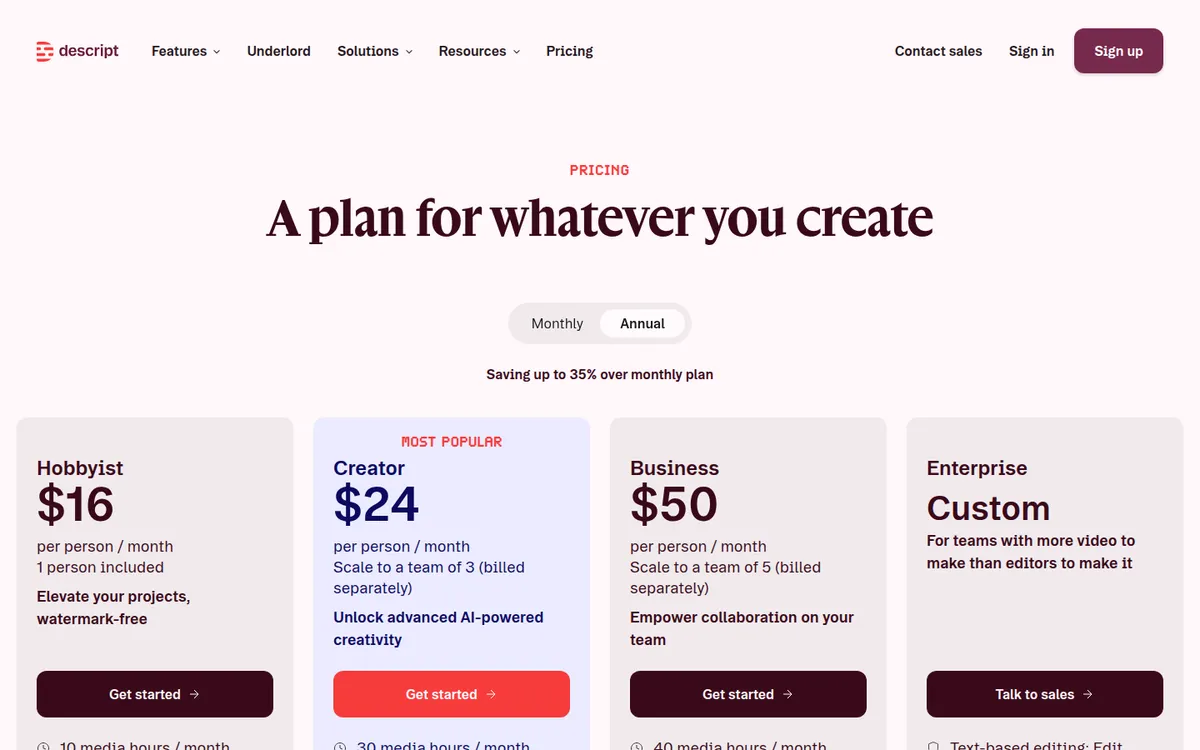
- Free plan (1 media hour/month, 720p, watermark); Hobbyist $16/month yearly ($24 monthly); Creator $24/month yearly ($35 monthly); Business $50 per person/month yearly ($65 monthly); Enterprise by quote
What works
- Edit audio and video by deleting or rewriting words in the transcript
- One-click Studio Sound and filler word removal for cleaner audio
- Remote recording (Rooms), screen recording and clip creation in one app
- A real free plan with no credit card needed
What doesn't
- Media hours and AI credits reset monthly and don't roll over
- Top-ups are only sold on Creator and Business, and they're non-refundable
- Refunds only within 48 hours of the invoice, with no proration
- Bugs, crashes and slow support are common complaints on Trustpilot
We have not used Descript for our own videos. This guide to Descript pricing is based on Descript's pricing page and help center, public user reviews on Trustpilot, Capterra and G2, and independent coverage, all checked on October 26, 2026. Sources are listed at the end.
The short version: Descript makes editing spoken content much faster, because you edit the transcript and the video follows. What you pay depends less on the plan price and more on how many hours you upload and how often you use the AI tools.
What Descript is
Descript is an audio and video editor built around a transcript. According to the vendor, it transcribes your recording automatically, and you cut video by deleting words, the way you'd edit a document.
The main features listed on Descript's site:
- Text-based editing: delete a sentence in the transcript and the matching audio and video are cut.
- Recording: Rooms for remote podcast and video recording with guests, plus a screen recorder.
- Audio cleanup: Studio Sound (noise removal and voice enhancement) and one-click removal of filler words and retakes.
- AI voices: a clone of your own voice or stock AI voices, so you can fix a word by typing it.
- Repurposing: short clips from long videos, captions, translation into "dozens of languages," and YouTube titles and thumbnails.
- Underlord: Descript's AI co-editor. The vendor says it can do bulk edits, center speakers, add zooms to hide jump cuts, write or review scripts, and turn docs, slides or blog posts into video.
Descript is strongest on content where people talk: podcasts, interviews, webinars, tutorials and talking-head marketing videos.
What Descript costs in 2026
These are the prices on Descript's pricing page on October 26, 2026. The page says annual billing saves "up to 35%."
| Plan | Billed yearly | Billed monthly | Media hours/month | AI credits | Max export | Seats |
|---|---|---|---|---|---|---|
| Free | $0 | $0 | 1 | 100 (one-time) | 720p, watermark | 1 |
| Hobbyist | $16/month | $24/month | 10 | 400/month | 1080p | 1 |
| Creator | $24/month | $35/month | 30 | 800/month | 4K | Up to 3 |
| Business | $50/person/month | $65/person/month | 40 | 1,500/month | 4K | Up to 5 |
| Enterprise | Quote | Quote | Custom | Custom | Custom | Custom |
A few other limits from the same page:
- Cloud storage: 5 GB on Free, 100 GB on Hobbyist, 1 TB on Creator, 2 TB on Business.
- Upload size: up to 1 GB per file on Free, 10 GB on Hobbyist, 20 GB on Creator, 50 GB on Business.
- Rooms recording: 2 hours a month on Free, 5 on Hobbyist, 15 on Creator, 25 on Business.
- Support: email and self-serve on Free, in-app live chat from Hobbyist, and priority support with an SLA only on Business.
Creator and Business are priced per person. A team of three on Creator billed yearly pays $72 a month, or $864 a year.
Is Descript free?
Yes, there's a free plan, and Descript's FAQ says you don't need a credit card to try it. It's meant for testing, though. You get 60 media minutes a month, 100 AI credits once (they don't refill), 720p exports with a watermark, and 5 GB of storage. The pricing page doesn't list a free trial of the paid plans.
The free plan is enough to edit one or two short episodes and see whether text-based editing suits you. It's not enough to publish anything professional, because of the watermark.
How media hours and AI credits actually work
This is where most of the frustration with Descript comes from, so it's worth understanding before you pay.
Descript changed its plans in late 2025. According to its help center, the new plans use two pools, media minutes and AI credits, in place of the old transcription hours and separate limits for each AI tool. Third-party guides date the switch to September 2025.
Media minutes count everything you upload or record, whether or not you transcribe it. That includes audio, video, Rooms sessions and screen recordings. Rooms bill the session length, not per guest: Descript's example is that a one-hour call with five people uses 60 minutes. The help article doesn't say how multitrack files are counted. Some third-party reviews, including one from Sonix (a competitor), say multitrack sessions eat minutes faster than users expected.
AI credits pay for Underlord, Studio Sound, Remove Filler Words, Green Screen, Eye Contact, AI voices and generated media. Descript publishes only one exact cap: Studio Sound and Remove Filler Words cost up to 30 credits per file each time you apply them. Other tools scale with media length and the model you choose. Underlord has no fixed price, because each chat message and each action it runs uses credits. Your Usage tab shows what each run cost after the fact.
Neither pool rolls over. Both reset when your billing cycle renews.
What this means in practice: if you run both Studio Sound and filler word removal on every episode, each episode uses at most 60 credits from those two tools. Creator's 800 credits would cover at least 13 episodes a month that way. If you also lean on Underlord for edits, that number drops, and Descript doesn't publish a per-task price you can plan around.
Top-up prices
When you run out, Creator and Business plans can buy top-ups. Hobbyist and Free plans can't, so on Hobbyist your only option is to wait for the reset or upgrade.
| Top-up | Price | Per unit |
|---|---|---|
| 350 AI credits | $35 | $0.10/credit |
| 1,000 AI credits | $80 | $0.08/credit |
| 4,000 AI credits | $200 | $0.05/credit |
| 5 media hours | $25 | $5.00/hour |
| 20 media hours | $80 | $4.00/hour |
| 50 media hours | $150 | $3.00/hour |
Top-ups are used only after your monthly allowance runs out, they expire 12 months after purchase, and the refund policy calls them non-refundable.
Refunds and cancellation
Descript's refund policy is short. Plan refunds are available within 48 hours of the invoice date. After that, canceling or downgrading takes effect at the end of your billing cycle, with no refund for unused time. That matters most on an annual plan, so test on monthly billing or the free plan first. Upgrades take effect right away, and Descript credits the unused time on your old plan.
What users praise
Descript rates 4.6 out of 5 on G2 (about 830 reviews, per G2's comparison pages and Descript's own homepage) and 4.7 on Capterra (182 reviews, as indexed in June 2026; Capterra blocked our direct check). The positive patterns are consistent:
- Editing speed. Reviewers most often say editing by transcript cuts their editing time for podcasts and interviews.
- Easy to learn. People without video editing experience report getting usable results quickly.
- Audio cleanup. Studio Sound and filler word removal come up often as reasons to stay.
What users complain about
Trustpilot tells a different story: 2.6 out of 5 from 290 reviews when we checked, with 43% one-star and 37% five-star. Unhappy customers are more likely to post there, so read it as a list of risks rather than a typical experience. The repeated themes:
- Credits running out. Reviewers describe AI credits draining fast on tasks that didn't work well. One wrote that they "burned through 800 credits just trying to clean up filler pauses."
- Bugs and stability. Crashes and glitches are a common complaint, including on the G2 side, where slow performance shows up in critical reviews.
- Billing and cancellation. Several reviewers say canceling was hard or that they were charged after they thought they'd stopped.
- Support. Reviewers describe slow or automated replies. Trustpilot shows Descript replying to only 3% of negative reviews.
Descript alternatives: Riverside, CapCut and timeline editors
| Tool | Entry paid price (yearly billing) | Free plan | Good fit if |
|---|---|---|---|
| Descript | $16/month (Hobbyist) | 1 media hour/month, watermark | You want to edit spoken content by text |
| Riverside | $24/month (Pro) | 2 recording hours, one-time, watermark | Recording quality with remote guests is the priority |
| CapCut | Varies by region | Yes | You make short social videos on a phone |
| Premiere Pro, DaVinci Resolve | Varies | Check each vendor | You need full timeline control |
Descript vs Riverside
Riverside started as a remote recording studio and has added text-based editing. Its pricing page lists Pro at $29 monthly or $24 a month billed yearly, Grow at $39 or $34, and a free plan with 2 hours of separate-track recording, once, at 720p with a watermark. Riverside's page and a Castmagic guide checked in August 2026 both list 5 recording hours a month on Pro, though some older guides say 15. Riverside also uses AI credits for some features, such as translation and AI B-roll.
Pick Riverside if you mostly record interviews with remote guests and want the recording side to be the strongest part. Pick Descript if editing is where your time goes, especially screen recordings, tutorials and solo videos.
Descript vs CapCut
CapCut is built for short vertical videos with templates, effects and trending formats. It's a better fit for TikTok and Reels made from scratch. Descript is better when you start with a long recording and want to cut it down by text and pull clips from it. CapCut's prices vary by country and platform, so check them in the app. For precise multi-layer timeline work, a traditional editor such as Premiere Pro or DaVinci Resolve is the better tool.
Who Descript fits
- Podcasters and interview shows who want to cut ums, retakes and tangents fast.
- Marketers and small teams making webinars, product demos and tutorials from screen recordings.
- Solo business owners who publish talking-head videos and don't want to learn a timeline editor.
Who should skip it
- Heavy AI users on a tight budget. Credits reset monthly, top-ups cost extra, and Underlord has no fixed per-task price.
- Hobbyist users who expect to scale. Hobbyist can't buy top-ups, so a busy month means upgrading to Creator.
- Editors who need frame-precise timeline work. A dedicated editor will serve you better.
- Anyone who wants a safety net on billing. Refunds close 48 hours after the invoice, and annual plans aren't prorated.
Is Descript worth it?
For someone who records a lot of spoken content, yes, most likely on Creator at $24 a month billed yearly. Text-based editing and one-click audio cleanup save real time, and 30 media hours covers a weekly podcast plus a fair amount of extra video.
Before you commit, start on the free plan or a monthly subscription. Upload a typical month of recordings, use the AI tools the way you normally would, and check the Usage tab. If your credits last the month, an annual plan is a good deal. If they don't, budget for top-ups or look at Riverside. You can see the current plans on Descript's pricing page.
FAQ
Is Descript free?
Yes. The free plan includes 60 media minutes a month, 100 one-time AI credits and 720p exports with a watermark. No credit card is needed. Paid plans start at $16 a month billed yearly or $24 billed monthly.
What happens when I run out of AI credits in Descript?
On Creator and Business, you can buy top-ups starting at 350 credits for $35. On Free and Hobbyist, top-ups aren't available, so you wait for your monthly reset or upgrade. Unused credits don't roll over.
Does Descript offer refunds?
Only within 48 hours of the invoice date, according to its refund policy. After that, cancellation takes effect at the end of the billing cycle with no refund for unused time. Top-ups are non-refundable.
Is Descript better than Riverside?
It depends on where your time goes. Riverside focuses on high-quality remote recording. Descript focuses on fast editing by transcript. Both have free plans, so record and edit one episode in each.
What is Descript Underlord?
Underlord is Descript's AI co-editor. According to the vendor, it can make bulk edits, add zooms and layouts, write or review scripts, and turn documents or slides into video. Each message and action uses AI credits.
Disclosure: if you buy through our links we may earn a commission. It never changes our verdict. Details.
Sources
- Descript: Pricing
- Descript: Homepage and features
- Descript: Underlord
- Descript Help: Track and understand your media minutes and AI credits
- Descript Help: Top ups
- Descript Help: Refund policy
- Descript Help: Legacy and sunset plans
- Descript reviews on Trustpilot
- Descript reviews on Capterra
- G2: Descript comparison pages
- eesel AI: Descript review (2026)
- Sonix: Descript pricing in 2026
- Riverside: Pricing
- Castmagic: Riverside pricing (2026)
Prices and features checked on October 26, 2026. Vendors change plans often, so confirm on the official site before buying.